variable-font subsetting
Deliver a variable font scoped to the styles a customer bought — not the whole family. vf-clamp is the delivery layer for per-purchase micro-VFs: a new licensing tier between static styles and the full family.
Under the hood it wraps fonttools’ varLib.instancer in a zero-install WASM runtime. Pass in a variable font and a map of axis constraints — pin an axis to remove it, restrict it to a sub-range, or leave it untouched. The output is a smaller, self-contained font trimmed to exactly the design space you declared.
Interactive demo
This is what a customer’s purchase produces. Load Encode Sans or drop any variable font, then select named instances — as if picking the styles in an order. Adjacent selections merge into a single output file; isolated selections generate their own, flagged in yellow. Preview the restricted design space live, watch the file size drop, then download the clamped fonts.
Load or drop any variable font to explore its instances
Integrations
vf-clamp is available as a CLI, and as native plugins for Glyphs.app, RoboFont, and VS Code — all using the same axis-constraint model as the npm package.
Run vf-clamp from any shell. Pass a font file, a JSON config, and get clamped outputs written to disk. Scriptable and CI-friendly.
vf-clamp clamp font.ttf --axis wght:400:700Right-click any .ttf in the Explorer to open the vf-clamp panel. Select instances, preview the design space, and export — without leaving your editor.
vf-clamp.vscode-extensionNative plugins for Glyphs.app and RoboFont. Select named instances from your open font (or a TTF/OTF on disk), preview the licensed design space in a live chart with an animated specimen, and export restricted VFs — without leaving your type editor. Both plugins share the same UI; pick the one for your tool.
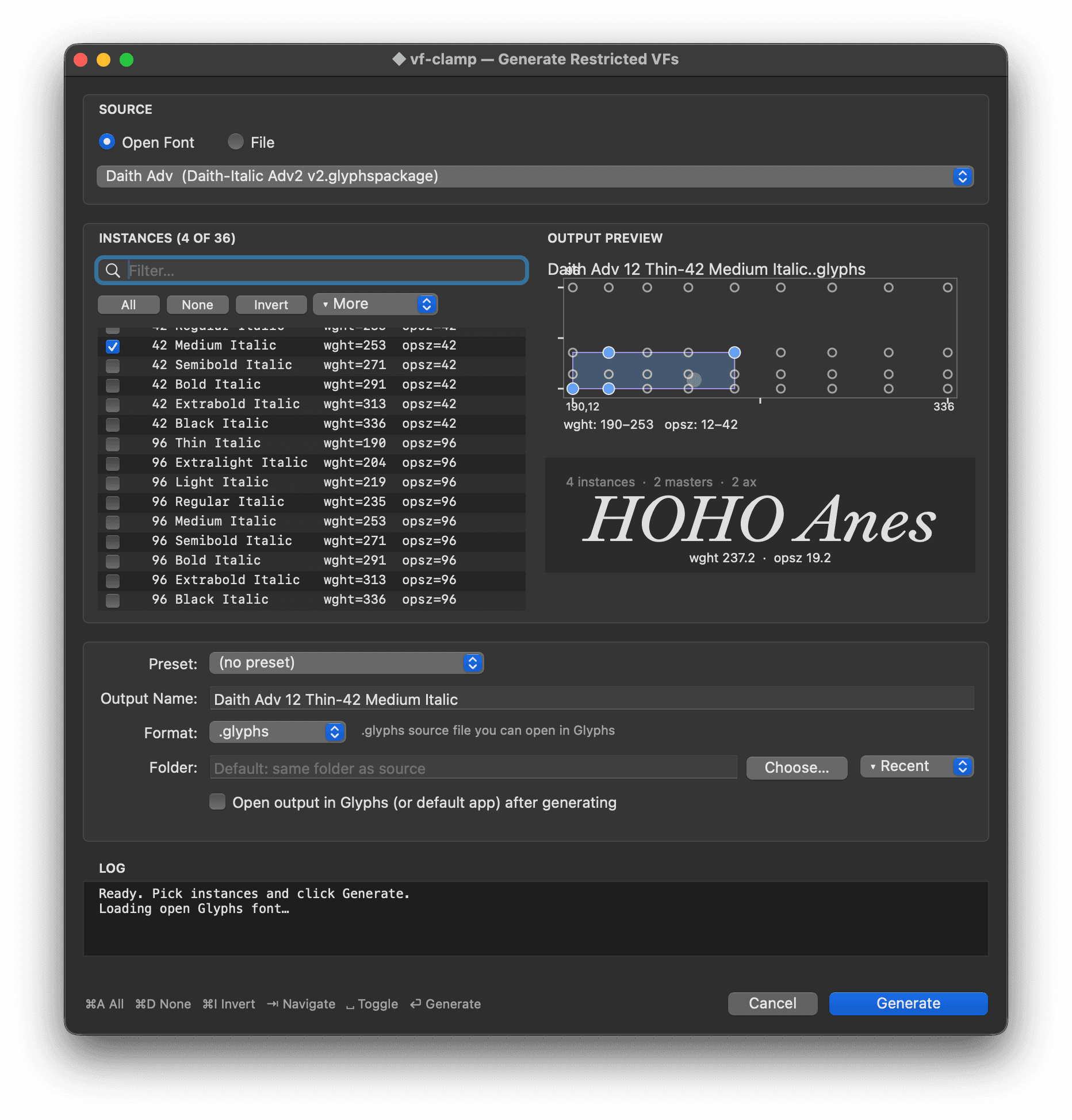
vf-clamp-glyphs.glyphsPluginvf-clamp.roboFontExtFor foundries
Today a variable font is almost always all-or-nothing: customers buy the whole family to get one, or they buy statics and lose interpolation entirely. vf-clamp adds the tier in between — a variable font scoped to the named instances a customer purchased, generated and delivered at checkout. It never hands over a named style that wasn’t bought.
Built by Overpunch: 15+ years building websites for type foundries, and the team behind Typetin, a self-serve storefront for independent foundries (in development).
Two adjacent styles become a variable purchase, not just two statics. Price a ladder — two-style VF, subfamily, full family — and capture customers who want interpolation but don’t need every weight.
A full VF exposes every weight — including ones the customer never paid for. A clamped VF’s axes, named instances and STAT entries stop at the purchased range, so the file matches the invoice. The licence’s terms still do the enforcing: simple two-master designs can be extrapolated past the range.
The name table — family, full name, PostScript name, unique ID — is rewritten to the purchased range, so menus and support tickets show exactly what was bought. For per-order tracing, add a watermark or order ID at fulfilment.
A site that uses only Medium–Black shouldn’t ship Thin–Light deadweight. Clamping drops the variation outside the licensed range: Inter Regular–Bold clamped is 22% smaller than the two static files on a Latin subset, and 72% smaller than the statics at seven styles.
Pin an axis to a coordinate that was never a named instance — a custom optical size or width — and sell that exact cut. The retail family doesn’t have to ship it for a customer to buy it.
Browsers now drive the optical-size axis automatically with font-optical-sizing: auto, keying off the rendered point size. As opsz matters more, delivering it clamped to a usable range keeps files honest and small.
The research
Sell the Styles, Ship the Space — a talk and paper on why variable fonts should reach customers who buy styles. We checked all 394 foundries in the Type Foundry Directory.
27 of the 35 licences we read never mention variable fonts. The paper sets out a four-part range licence — scope on the invoice, a grant for instances inside it, a right to optimise, and a fence against widening.
How it works
Start from named instances
Variable fonts ship with named instances — presets like Regular, Bold, or Condensed that map to specific axis coordinates. Use getInstances() to read them, then pass adjacent instances as a subfamily to produce a restricted VF that spans exactly that slice of the design space.
Pin an axis to remove it
Setting an axis to a number fixes it at that value and removes it from the output font’s fvar table. Unused glyph masters and gvar deltas are stripped — the result is a smaller, static-like font with no unnecessary variation.
Range-restrict to slim the space
Passing { min, max } keeps the axis variable but clips it to that sub-range. Masters outside the bounds are pruned — a 100–900 weight axis becomes a tight 400–700 slice without changing how the axis behaves inside that range.
No Python, multiple outputs
fonttools runs inside Pyodide — a Python interpreter compiled to WebAssembly. One clampFont() call produces any number of restricted variants from the same source. The Pyodide instance is a shared singleton: the cold start is paid once per process, subsequent calls are fast.
Usage
From named instances — design-space range computed automatically
import { clampFont } from '@overpunch/vf-clamp'
import { readFile, writeFile } from 'fs/promises'

const source = await readFile('Omnes-VF.ttf')

const results = await clampFont(source, {
  outputs: [
    // one VF spanning the full weight range for Condensed
    {
      name: 'Condensed',
      instances: ['Condensed Thin', 'Condensed Black'],
    },
    // one VF for a narrower weight slice of SemiCondensed
    {
      name: 'SemiCondensed Text',
      instances: ['SemiCondensed Light', 'SemiCondensed Bold'],
    },
  ],
})

for (const result of results) {
  await writeFile(`Omnes-${result.name}-VF.ttf`, result.buffer)
}
From explicit axis ranges
const results = await clampFont(source, {
  outputs: [
    // pin wdth to 75 — axis removed from output
    { name: 'Condensed', axes: { wdth: 75 } },

    // restrict wdth to a range — axis stays variable
    { name: 'SemiCondensed', axes: { wdth: { min: 87.5, max: 100 } } },
  ],
})
Mix instances and axes — explicit axes override the computed range
const results = await clampFont(source, {
  format: 'woff2',
  outputs: [
    {
      name: 'Condensed Text',
      instances: ['Condensed Light', 'Condensed Bold'],
      // clamp the opsz axis independently of the named instance range
      axes: { opsz: { min: 8, max: 24 } },
    },
  ],
})
Inspect a font first
import { getInstances } from '@overpunch/vf-clamp'
import { readFile } from 'fs/promises'

const font = await readFile('MyFont-VF.ttf')
const { axes, instances } = await getInstances(font)

// axes: [{ tag: 'wght', name: 'Weight', minimum: 100, default: 400, maximum: 900 }, ...]
// instances: [{ name: 'Regular', coordinates: { wght: 400 } }, ...]
CLI — from the shell
# Pin wght, restrict wdth, keep all other axes
npx @overpunch/vf-clamp-cli clamp font.ttf \
  --output out/ \
  --axis wght:400 \
  --axis wdth:75:100 \
  --axis opsz:keep

# tag:value       → pin axis at value (axis removed from output)
# tag:min:max     → restrict to range (axis stays variable)
# tag:*  tag:keep → keep full original range (explicit no-op)
Axis value reference
| Value | Effect |
|---|---|
| number | Pin axis at value — removed from output design space |
| { min, max } | Restrict to range — axis stays variable within bounds |
| null | Explicitly keep full original range — same as omitting the axis entirely |
| omitted | Keep full original range — axis is unchanged |
REST API — the delivery layer
This is how a storefront wires vf-clamp into checkout: turn a purchase event into a delivered file. vfclamp.com exposes two endpoints — one to read a font’s instances, one to clamp and return scoped fonts by URL. Both require an API key. Contact hello@overpunch.ca to request access.
POST https://vfclamp.com/api/clamp
X-API-Key: <your-key>

{
  "fontUrl": "https://cdn.example.com/MyFont-VF.ttf",
  "format": "woff2",
  "outputs": [
    { "name": "Text", "instances": ["Light", "Bold"] },
    { "name": "Condensed", "axes": { "wdth": 75 } }
  ]
}
// → { results: [{ name, data, format, size }] }

POST https://vfclamp.com/api/instances
X-API-Key: <your-key>

{ "fontUrl": "https://cdn.example.com/MyFont-VF.ttf" }
// → { axes: [...], instances: [...] }
Limitations
Isolated selections produce static-like output
An output built from a single named instance — or from instances that all share the same coordinates — pins every axis and removes it from the design space. The result is a minimal font with no variation, not a variable font. Select a run of adjacent instances to keep variation: the demo, like planOutputs(), merges styles only when no unbought named style falls between them, so Regular and Bold alone come back as two files.
Named instances must exist
The instances path looks up coordinates by name from the font’s fvar table. If a name doesn’t match exactly, clampFont throws. Use getInstances() to discover what names the font exposes before building your config.
Cold start latency
Pyodide (the Python WASM runtime) takes ~10 s to initialise on first use per process. Subsequent calls are fast. On vfclamp.com the engine is kept warm with a cron ping — cold starts mainly affect self-hosted or edge deployments.
Default axis value clamping
If you restrict an axis to a range that excludes its default value — for example, restricting wght to 100–300 when the font’s default is 400 — fonttools silently clamps the default to the nearest bound. The output is valid, but the default weight will be 300, not 400. The Glyphs and RoboFont plugins log a console warning when this occurs.
CFF2 variable fonts
fonttools’ varLib.instancer has limited support for OTF/CFF2-based variable fonts. TTF (glyf + gvar) is fully supported. Most variable fonts shipping today are TTF-based, but if your font uses CFF2 outlines the instancer may error or produce unexpected results.
Output size
How much a clamped font shrinks depends on the source. Fonts with many intermediate masters across a wide axis range compress well; fonts with few masters may see little size reduction regardless of the range specified.
Single-threaded processing
Pyodide runs on a single thread. Multiple concurrent clampFont() calls queue behind each other. For batch workloads, process fonts sequentially or spread calls across multiple Node.js processes.